
What is a Financial Calculator and Why You Need One
A financial calculator is an essential tool for anyone who needs to perform complex financial calculations. Whether you’re calculating loan payments, interest rates, or investment returns, this device simplifies the process and ensures accuracy.
By mastering how to use a financial calculator, you can gain a better understanding of your financial health and make smarter decisions.
In this guide, we’ll walk you through how to use a financial calculator for a variety of common applications, including calculating mortgage payments, investment growth, interest rates, and more. With this tool at your disposal, you’ll be able to handle any financial scenario with confidence.
1. Key Features of a Financial Calculator
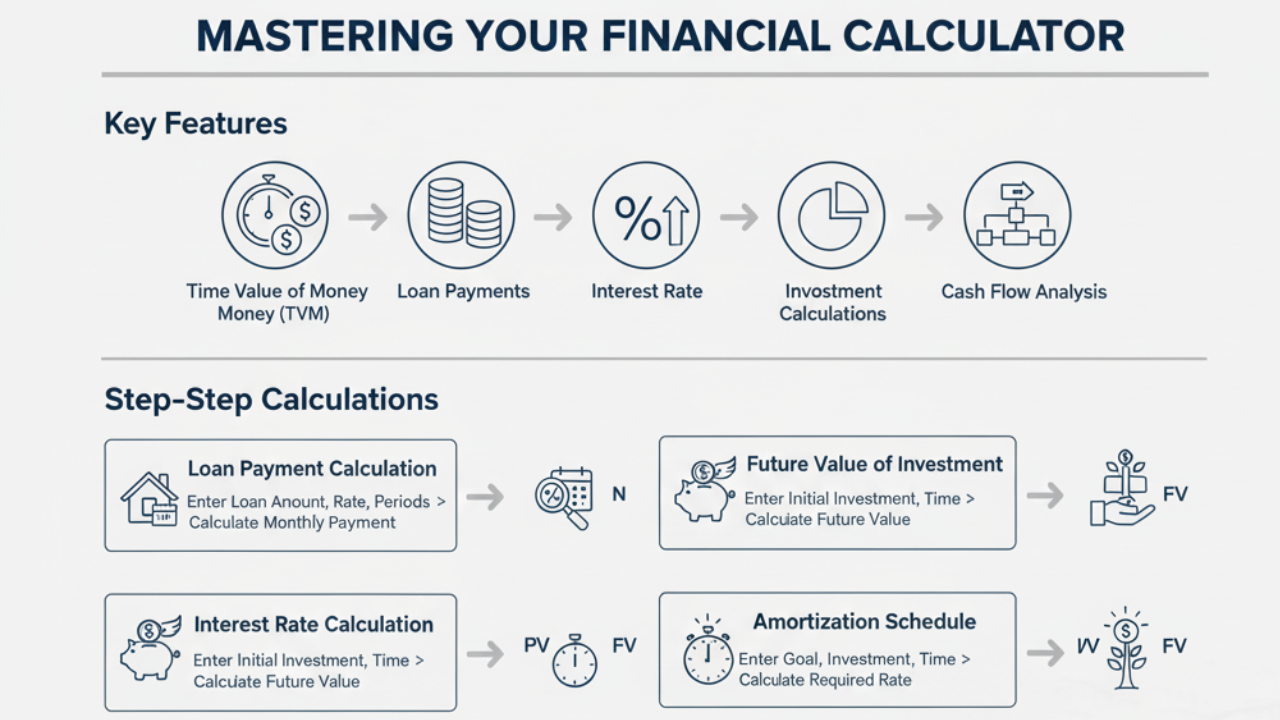
Before diving into specific calculations, it’s important to understand the core features of most financial calculators:
-
Time Value of Money (TVM): The financial calculator allows you to calculate the future and present values of money, considering the effect of interest rates.
-
Loan Payments: Calculate monthly payments for different loan amounts, interest rates, and loan terms.
-
Interest Rate Calculation: Determine the interest rate required to meet specific financial goals.
-
Amortization: See how loan payments are split between interest and principal over time.
-
Investment Calculations: Project how much an investment will grow based on certain parameters (e.g., principal, interest, time period).
-
Cash Flow Analysis: Analyze the inflows and outflows of cash to assess financial performance.
2. How to Use a Financial Calculator for Loan Payments
One of the most common uses of a financial calculator is calculating loan payments. Whether you’re dealing with a mortgage, auto loan, or student loan, here’s how you can easily calculate the monthly payment:
Step 1: Set the Calculator to Loan Mode
-
Make sure your financial calculator is set to the correct loan mode for the calculation. This typically involves selecting a setting for monthly payments, interest rates, or loan terms.
Step 2: Enter the Loan Amount (PV)
-
PV (Present Value) represents the total loan amount or principal. Input the total amount you are borrowing.
Step 3: Input the Interest Rate (I/Y)
-
I/Y (Interest per Period) refers to the interest rate applied to the loan. If the interest rate is annual, divide by 12 to calculate the monthly interest rate.
Step 4: Enter the Number of Payment Periods (N)
-
N (Number of Periods) is the total number of payment periods. For a 30-year mortgage with monthly payments, you would enter 360 months.
Step 5: Calculate the Payment (PMT)
-
PMT is the fixed monthly payment you will be making for the loan. Press the compute button, and the calculator will display the monthly payment amount.
Example Calculation:
-
Loan Amount: $250,000
-
Annual Interest Rate: 4% (divide by 12 for monthly rate: 0.33%)
-
Loan Term: 30 years (360 months)
After entering these values, your monthly payment (PMT) will be calculated.
3. How to Calculate Future Value of an Investment
Financial calculators are also commonly used for investment analysis, allowing you to calculate the future value (FV) of an investment.
Step 1: Set the Calculator to Investment Mode
-
Choose the investment calculation mode (typically labeled as FV mode).
Step 2: Input the Initial Investment (PV)
-
PV (Present Value) represents the starting amount of your investment (e.g., $5,000).
Step 3: Enter the Interest Rate (I/Y)
-
Enter the annual interest rate that your investment is expected to earn (e.g., 6%).
Step 4: Enter the Number of Periods (N)
-
The number of periods represents how many times your investment will grow. For example, for a 10-year investment with annual compounding, enter 10.
Step 5: Calculate the Future Value (FV)
-
Press the compute button to calculate the future value of your investment, taking into account compound interest.
Example Calculation:
-
Initial Investment (PV): $5,000
-
Interest Rate: 6% annually
-
Time Period: 10 years
The calculator will compute how much your investment will grow in 10 years, factoring in compound interest.
4. How to Determine the Interest Rate for a Loan or Investment
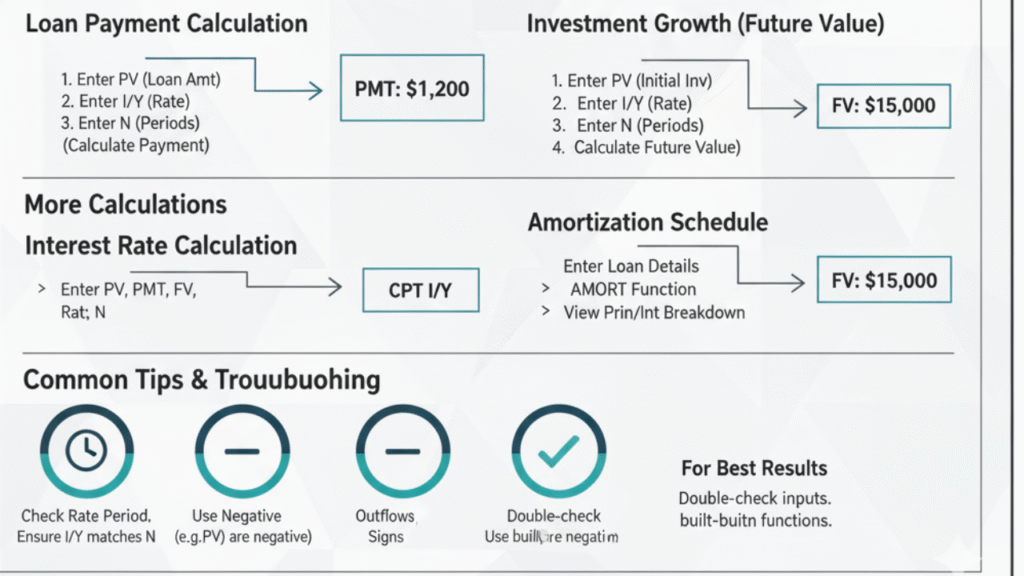
You can also use a financial calculator to determine the interest rate (I/Y) that would allow you to meet your financial goals. For instance, if you’re saving for a goal and want to know what rate you need to achieve a certain future value, here’s how to calculate it.
Step 1: Set the Calculator to Rate Mode
-
Ensure your calculator is in rate calculation mode.
Step 2: Enter the Present Value (PV) and Future Value (FV)
-
Input the current value (e.g., your current loan balance or investment) and the future value (e.g., the loan payoff or the investment goal).
Step 3: Input the Number of Periods (N)
-
Enter the number of periods (e.g., months, years) for which the money will be invested or the loan will be repaid.
Step 4: Calculate the Interest Rate (I/Y)
-
Press the compute button, and the financial calculator will determine the interest rate required to reach your desired future value or loan payment.
5. Using a Financial Calculator for Amortization
The amortization feature is useful for understanding how your loan payments are split between the principal and interest over the loan term. It helps you visualize the progress of loan repayment and see how much interest you’re paying over time.
Step 1: Set the Calculator to Amortization Mode
-
Select amortization mode on your financial calculator.
Step 2: Input Loan Information
-
Enter the loan amount, interest rate, payment period, and other relevant information.
Step 3: Generate Amortization Schedule
-
The calculator will create a schedule showing how each payment contributes to the principal and how much is spent on interest.
6. Common Mistakes to Avoid When Using a Financial Calculator
-
Incorrect Interest Rate Period: Ensure that you divide the annual interest rate by the number of periods if you’re working with monthly or quarterly payments.
-
Misunderstanding Time Periods: Clarify whether you’re working with months or years and input the correct number of periods accordingly.
-
Mixing Up Cash Inflows and Outflows: Always remember that money you borrow or pay is usually entered as a negative number, while money you receive is positive.
Frequently Asked Questions (FAQs)
How do I use a financial calculator to calculate my mortgage payment?
A: To calculate your mortgage payment using a financial calculator, follow these steps:
-
Set the calculator to loan mode.
-
Enter the loan amount (PV): This is the total amount of money you are borrowing.
-
Input the interest rate (I/Y): The interest rate applied to the loan, usually expressed as an annual rate.
-
Enter the loan term (N): This is the length of time you will make payments, typically in months.
-
Press “compute” to get your monthly payment amount (PMT).
How do I calculate the future value of my investment?
A: To calculate the future value (FV) of an investment, you need to input:
-
The initial investment amount (PV).
-
The interest rate (I/Y).
-
The number of investment periods (N).
-
Press “compute” to determine the future value of your investment after the specified time period.
Can I use a financial calculator for savings and retirement planning?
A: Yes! A financial calculator is ideal for savings and retirement planning. You can use it to calculate how much you need to save each month to reach a specific savings goal or estimate how much your current savings will grow over time based on a certain interest rate and time frame.
How do I calculate the interest rate using a financial calculator?
A: To calculate the interest rate for a loan or investment:
-
Set the calculator to rate mode.
-
Input the loan amount (PV), monthly payment (PMT), and number of periods (N).
-
Press “compute” and then select the interest rate (I/Y) button to determine the rate you need for the loan or investment.
What are the most common financial calculations I can do with a financial calculator?
A: Common calculations include:
-
Mortgage payments: Calculate monthly payments based on loan amount, interest rate, and loan term.
-
Investment growth: Project the future value of an investment with a given interest rate and time period.
-
Loan amortization: Break down the payments between interest and principal.
-
Interest rates: Find out the interest rate needed for a loan or investment to meet a specific goal.
-
Cash flow analysis: Evaluate the flow of money in and out of an investment or business.
Why is the financial calculator important for financial planning?
A: A financial calculator is crucial for effective financial planning because it helps you make informed decisions about loans, investments, and savings. By using it, you can calculate your expected monthly payments, determine your future financial goals, and understand the impact of interest rates, helping you plan your finances better.
Can I use a financial calculator for business finance?
A: Yes, financial calculators are commonly used for business finance tasks, such as calculating business loan payments, investment returns, cash flow projections, and break-even analysis. These calculations help business owners and financial analysts make more accurate financial decisions.
What is the difference between a financial calculator and a regular calculator?
A: Unlike a regular calculator, which only performs basic arithmetic operations, a financial calculator is designed to perform specialized financial functions like calculating loan payments, interest rates, present and future values, and investment growth. It saves time and ensures accurate results for financial calculations.
How accurate are the calculations from a financial calculator?
A: Financial calculators provide high accuracy, as long as the correct values are input. They use established financial formulas and amortization schedules, which are widely accepted in the finance industry. However, always verify the input data (such as interest rates and periods) for the best results.
7. Conclusion
Using a financial calculator can dramatically simplify your financial decision-making process. Whether you’re calculating mortgage payments, investment growth, or loan interest rates, mastering how to use a financial calculator empowers you to make smarter, more informed decisions about your money.
By following the step-by-step instructions above, you can confidently handle various financial scenarios and stay on top of your financial goals.